Building an AI Assistant with OpenAI: A Practical Architecture Guide
An AI assistant becomes useful when it can answer with approved knowledge, interact with business systems through controlled tools, remember the right conversation context, and stop for human review when an action carries risk. OpenAI’s Responses API provides a modern foundation for this design by supporting model responses, built-in tools, function calling, and multi-turn workflows through one API surface.
This guide shows how to design an assistant for a real small-business workflow—not just a chat demonstration. The example assistant answers service questions, searches company documents, looks up customer information, and prepares a CRM follow-up while keeping permissions and final authority outside the model.
Problem: a chatbot without business context cannot finish the job
A basic chat interface can produce fluent text, but it may not know current policies, customer history, service availability, or what actions the user is authorized to request. Employees still have to search documents, open the CRM, verify details, and complete the process manually.
Giving a model unrestricted access creates the opposite problem. The assistant may use the wrong record, pass malformed data to an application, or perform an action that should have required approval. A production assistant needs bounded capabilities and a reliable control layer.
Why it matters
A well-designed assistant reduces searching, drafting, and application switching. Customers receive faster answers, employees begin with organized context, and routine transactions follow a consistent process. The business also gains an audit trail showing which sources, tool results, and approvals supported the outcome.
The value should be measured through resolution time, first-response time, handling time, correction rate, escalation rate, and customer satisfaction—not the number of messages generated.
Solution: use the Responses API as the assistant’s reasoning layer
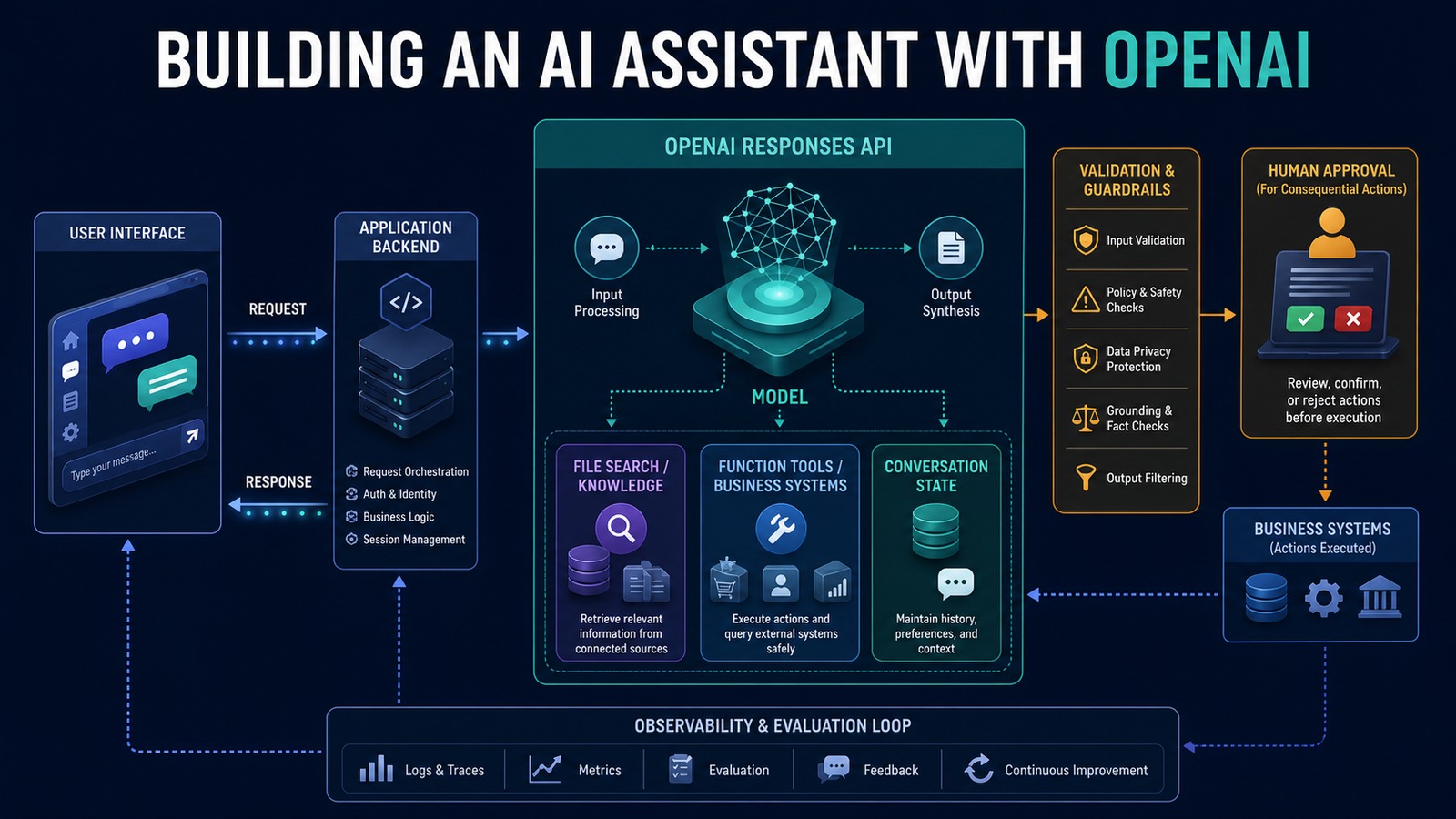
OpenAI recommends the Responses API for reasoning, tool-calling, and multi-turn workflows. The application sends instructions and user input, exposes only approved tools, and processes the response. If the model requests a function, the application validates the arguments, executes the function, and returns the result so the model can prepare the next step.
For current model selection, OpenAI documents GPT-5.6 Sol for frontier capability, GPT-5.6 Terra for a balance of capability and cost, and GPT-5.6 Luna for efficient, high-volume workloads. The correct choice should be established with representative evaluations rather than assumed from model size alone.
Architecture
User / Web App / Teams Interface ↓ Application API and authentication ↓ Input validation and policy ↓ OpenAI Responses API ↙ ↓ ↘ File Search Function Tools Conversation State ↓ ↓ ↓ Approved Docs CRM / Calendar / Database ↘ ↓ ↙ Tool-result and output validation ↓ Risk, confidence and approval check ↙ ↘ Human approval Safe response/action ↘ ↙ User response, trace and metrics
The model does not directly hold database credentials. Your application owns authentication, authorization, validation, execution, and logging. Tools should be narrow: find_customer, check_availability, or create_followup_draft are safer than a general database or administrator tool.
Example workflow: service inquiry to CRM follow-up
Customer asks about a service ↓ Assistant searches approved service documents ↓ Assistant requests find_customer(email) ↓ Application validates and queries vTiger ↓ Assistant combines policy and customer context ↓ Assistant prepares an answer and follow-up draft ↓ High-value or unusual request → employee approval Routine informational answer → return to customer ↓ Trace, sources, latency and outcome are recorded
If the knowledge source does not support an answer, the assistant should say what is missing and escalate. It should not invent a policy, price, or commitment.
Technology stack
- OpenAI Responses API: model responses, reasoning, tools, and multi-turn continuation.
- OpenAI File Search: retrieval from approved documents stored in a vector store.
- Function calling: structured requests to application-owned business functions.
- Python or Node.js: application API, validation, tool handlers, and response processing.
- n8n: event orchestration, notifications, approvals, and downstream integrations.
- vTiger and PostgreSQL: customer records, workflow state, audit data, and reporting.
- Docker: repeatable deployment and separation of services.
Implementation
1. Define one assistant job
Choose a narrow outcome such as answering service questions and preparing a CRM follow-up. Document what the assistant may do, what it must never do, and when it must escalate.
2. Select the model through evaluation
Build a representative test set before choosing the production model. Compare task success, tool-call accuracy, groundedness, latency, and cost. Use the smallest configuration that reliably meets the business requirement.
3. Write concise instructions
State the assistant’s role, approved sources, required output, refusal and escalation conditions, and tool policy. Keep rules in one place and avoid contradictory repetition.
4. Add knowledge retrieval
Upload only approved, current documents. Organize them with useful metadata, test common questions, and require the assistant to distinguish retrieved facts from assumptions. Establish an owner and review date for every knowledge source.
5. Define focused function tools
Give each tool a clear name, description, input schema, return fields, and error behavior. Validate arguments on the server and enforce user permissions independently of the model.
6. Manage conversation state deliberately
Continue related turns with the appropriate response or conversation reference, or manage the necessary history in your application. Do not treat conversation state as permanent business memory; store durable facts in the CRM or another system of record.
7. Add human approval
Require approval for commitments, financial actions, record deletion, sensitive data changes, or low-confidence outcomes. Show the source input, proposed action, evidence, and editable fields in the approval screen.
8. Validate every boundary
Validate user input, function arguments, tool output, model output, and final system updates. Use structured outputs where appropriate and reject missing or unexpected fields.
9. Add safety and privacy controls
Use least-privilege credentials, isolate customers, minimize data sent to the model, redact logs, rotate secrets, and treat documents and web content as untrusted input. External text must never be allowed to redefine application permissions.
10. Evaluate and monitor
Test normal, ambiguous, adversarial, and unavailable-tool scenarios. In production, monitor tool failures, unsupported answers, corrections, escalations, latency, token use, and business outcomes. Re-run evaluations after model, prompt, tool, or document changes.
Benefits
- Time savings: less searching, summarizing, drafting, and CRM preparation.
- Money savings: more service capacity without proportional administrative work.
- Error reduction: structured tools and validation reduce malformed or duplicate updates.
- Customer experience: faster answers grounded in approved information.
- Governance: permissions, sources, actions, and approvals remain traceable.
Common mistakes
- Building on the deprecated Assistants API instead of the Responses API for a new project.
- Giving the model broad database or administrator access.
- Using conversation history as the system of record.
- Publishing answers without testing retrieval quality and unsupported questions.
- Allowing model output to trigger irreversible actions without validation.
- Choosing a model without representative quality, latency, and cost evaluations.
Read also
- The Complete Guide to AI Automation for Small Businesses
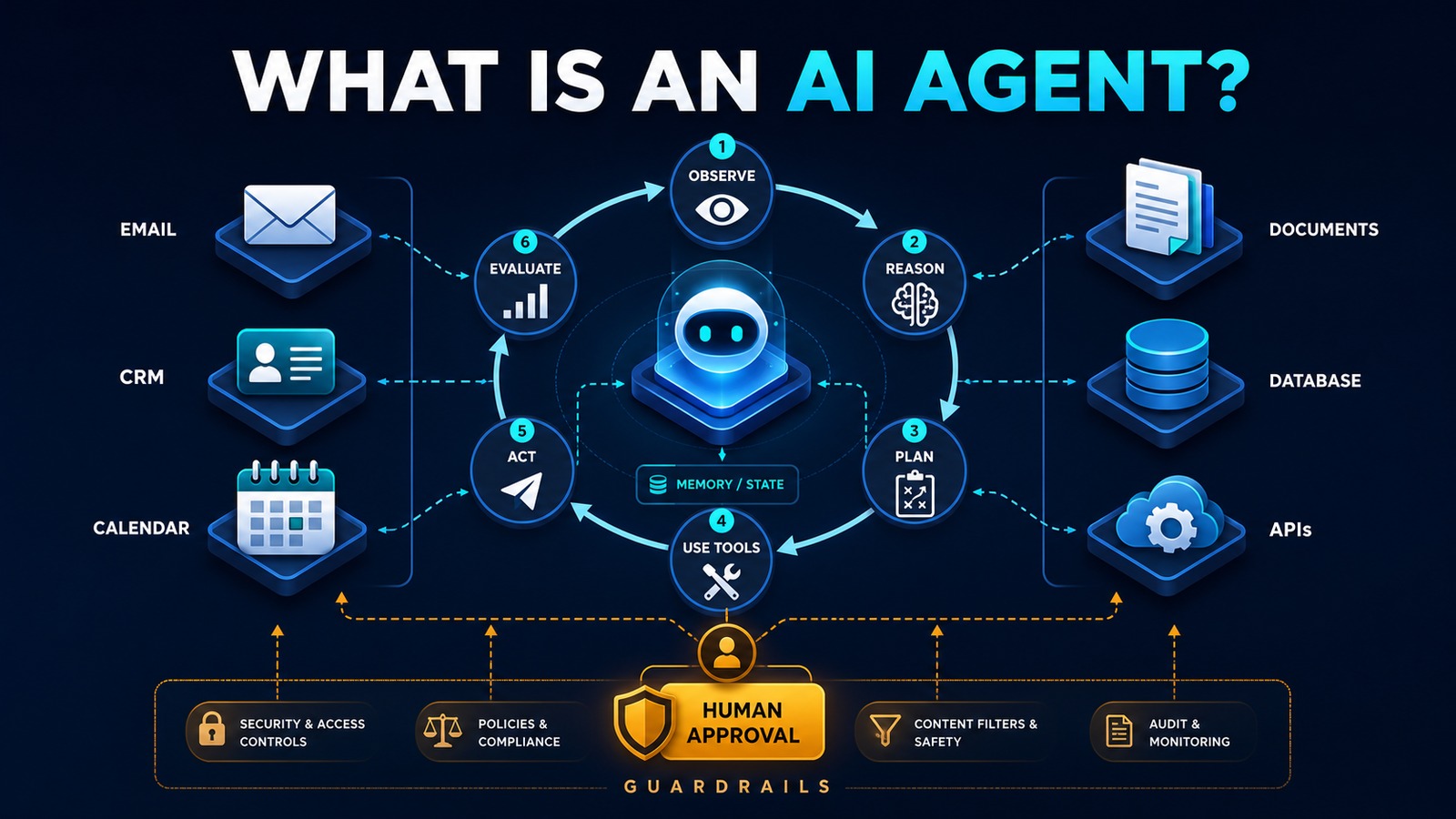
- What Is an AI Agent?
- Practical AI for Small Businesses
Official OpenAI references
Build capability around clear boundaries
A dependable AI assistant is an application system, not just a prompt. Use the Responses API for model and tool workflows, keep business authority in your application, retrieve only approved knowledge, expose focused tools, and prove performance with evaluations. That architecture creates useful assistance without surrendering control.
Need help implementing this?