Choosing the Right LLM for Your Business: A Practical Decision Framework
Choosing a large language model is a business-design decision, not a contest to identify the most powerful model. A customer-support classifier, contract-review assistant, marketing-draft workflow, and complex research agent have different requirements. Using the same model for every task can create unnecessary cost, slow responses, or quality that is inadequate for the risk.
The practical approach is to define the workload, eliminate models that fail non-negotiable requirements, and compare a small shortlist using representative evaluations. The result may be one model—or a routing strategy that sends different tasks to different model tiers.
Problem: model selection often starts with marketing claims
Public benchmarks summarize broad capabilities, but they do not reproduce your documents, customers, tool schemas, prompts, response-time targets, or failure costs. A model that ranks highly on general reasoning may be excessive for extracting five fields from an invoice. A low-cost model may become expensive if employees must correct too many outputs.
Teams also compare token prices while ignoring the total cost of a completed task: retries, long prompts, tool calls, review time, latency, and errors. Selecting by one metric produces a fragile production decision.
Why it matters
The model influences answer quality, customer experience, operating cost, privacy design, integration options, and how much human review a workflow needs. A poor fit can make a useful idea appear unworkable. A workload-specific selection process can deliver the required result with a smaller, faster configuration.
Model selection also changes over time. Providers improve models, prices change, and business requirements evolve. Applications should make the model configurable and preserve an evaluation suite so changes can be tested rather than guessed.
Solution: select by workload and evidence
Start with the outcome. Define what a correct response looks like, how quickly it must arrive, what information it may process, which tools it must use, and what an error would cost. Then compare candidates on the same examples.
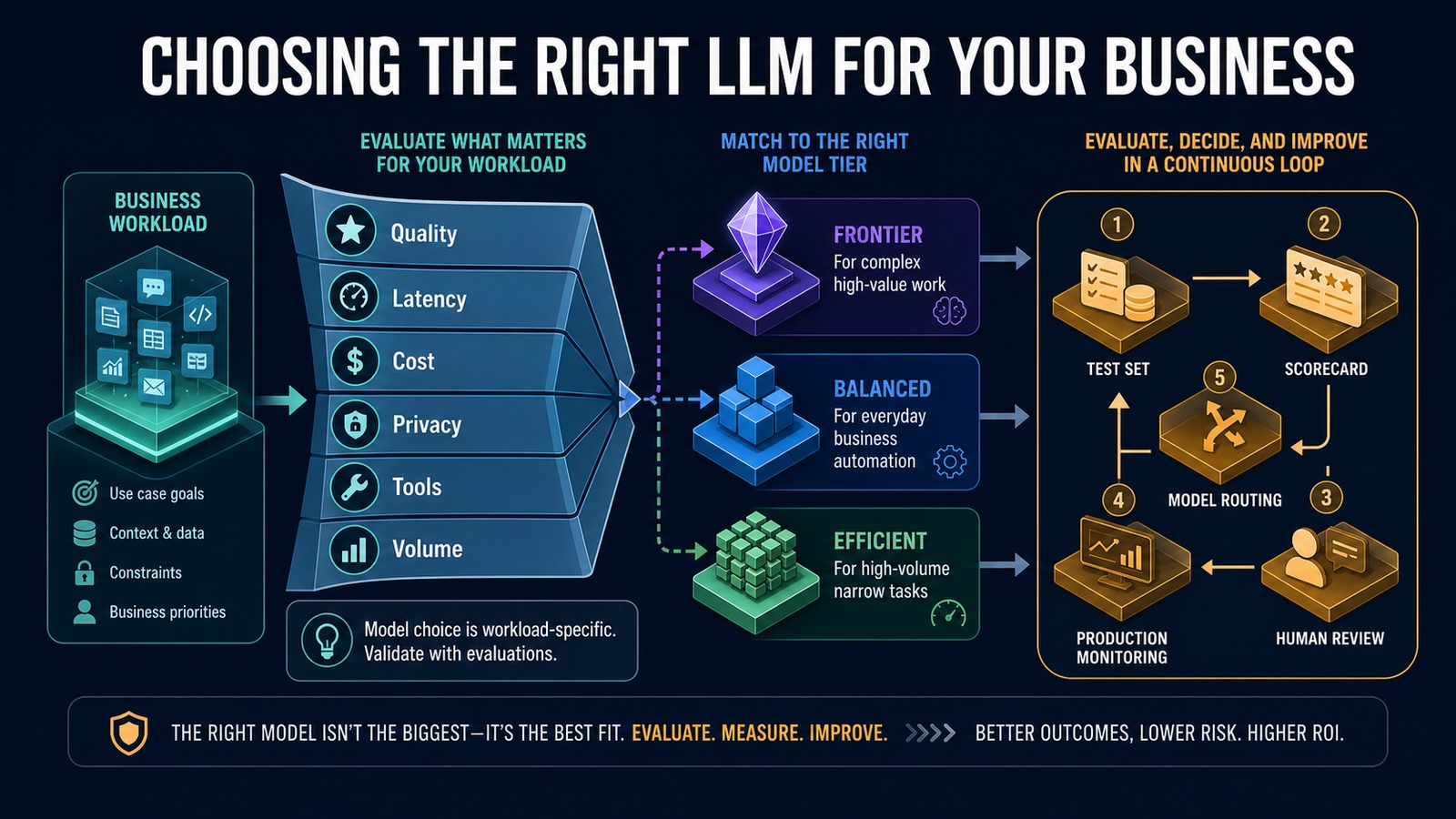
Current official OpenAI documentation describes GPT-5.6 Sol as the frontier option for complex professional work, GPT-5.6 Terra as the balance of intelligence and cost, and GPT-5.6 Luna as the efficient choice for cost-sensitive, high-volume workloads. These roles provide a useful shortlist, but your evaluations should make the final decision.
Six selection criteria
1. Quality
Measure task success, factual accuracy, groundedness, instruction following, structured-output validity, tool selection, and the severity of errors. Use human-reviewed examples that reflect normal and difficult cases.
2. Latency
Interactive assistants need fast perceived response; background document processing may tolerate more time. Measure median and slow-case latency with the full workflow, including retrieval and tools.
3. Total cost
Include input and output tokens, cached content, tools, retries, infrastructure, and human correction. Calculate cost per successfully completed business transaction rather than cost per API request.
4. Privacy and governance
Document the data involved, retention needs, access controls, deployment restrictions, and regulatory obligations. Minimize data, redact unnecessary fields, and confirm current provider policies for the account and service being used.
5. Capabilities and tools
Verify required modalities, context, structured output, function calling, file search, web search, vision, or realtime audio. Do not pay for capabilities the workflow does not use.
6. Volume and reliability
Estimate peak throughput, rate limits, concurrency, retry behavior, and fallback needs. High-volume narrow work often benefits from an efficient tier, while complex exceptions can be routed to a stronger model or a person.
Architecture
Business workload and risk classification ↓ Quality / Latency / Cost / Privacy / Tools / Volume ↓ Candidate model shortlist ↙ ↓ ↘ Frontier tier Balanced tier Efficient tier ↘ ↓ ↙ Representative evaluation dataset ↓ Accuracy, validity, latency, cost and review score ↓ Routing and approval policy ↙ ↘ Production model Human/fallback path ↘ ↙ Monitoring, regression tests and re-evaluation
Example: one business, three model tiers
A service company may use an efficient model to classify thousands of incoming messages into known queues. A balanced model can draft customer replies using CRM context and approved knowledge. A frontier model can handle complex research, ambiguous cases, or multi-tool planning where a quality improvement justifies higher cost and latency.
Incoming request ↓ Rule checks type, risk and complexity ↓ Simple classification → efficient model Routine grounded reply → balanced model Complex reasoning/tool workflow → frontier model High-risk or uncertain result → human review ↓ Outcome and correction feed the evaluation dataset
This routing design avoids using the most expensive option for every request while preserving a stronger path for difficult work.
Technology stack
- OpenAI Responses API: model execution, tools, structured outputs, and multi-turn workflows.
- OpenAI GPT-5.6 family: frontier, balanced, and efficient workload tiers.
- Python: evaluation runner, schemas, scoring, routing, and test automation.
- n8n: workflow triggers, approvals, integrations, and fallback handling.
- PostgreSQL: test cases, traces, scores, cost, latency, and business outcomes.
- vTiger: customer context and workflow results.
- Docker: repeatable evaluation and application environments.
Implementation
1. Define the exact task
Write the input, expected output, constraints, users, systems, and completion criteria. Separate classification, extraction, drafting, reasoning, and tool-use tasks when possible.
2. Establish non-negotiables
Set the privacy, modality, tool, context, latency, throughput, and budget requirements. Remove candidates that cannot satisfy them.
3. Build a representative test set
Include normal, difficult, incomplete, adversarial, and high-risk cases. Preserve expected fields, acceptable answers, grading rubrics, and escalation conditions.
4. Test a small shortlist
Run the same prompt, tools, data, and output schema across candidates. Use fixed model versions when reproducibility matters.
5. Score business outcomes
Measure correctness, groundedness, schema validity, tool-call accuracy, latency, cost, corrections, and escalation. Weight serious mistakes more heavily than stylistic differences.
6. Tune configuration before upgrading
Improve instructions, retrieval, tool descriptions, schemas, and reasoning settings. A better system design may allow a smaller model to meet the requirement.
7. Design routing and fallback
Use deterministic rules to send work to the appropriate tier. Add retry limits, a stronger-model fallback where justified, and human review for consequential cases.
8. Monitor production
Track quality signals, corrections, latency, cost per successful task, tool failures, and drift. Add real failures to the evaluation set and re-test before changing models.
Benefits
- Time savings: the right latency and capability for each workflow.
- Money savings: efficient models handle high-volume narrow work.
- Error reduction: representative evaluations expose failures before launch.
- Customer experience: faster routine responses with stronger handling for complex cases.
- Flexibility: configurable routing reduces dependence on one model choice.
Read also
- The Complete Guide to AI Automation for Small Businesses
- Building an AI Assistant with OpenAI
- AI vs Traditional Automation
Official OpenAI reference
OpenAI API model catalog and model-selection guidance
Choose the system, not only the model
The best LLM is the one that produces an acceptable business outcome inside your quality, latency, cost, privacy, and operational constraints. Start with evidence, keep model selection configurable, and route work according to complexity and risk. A disciplined evaluation process is more durable than any leaderboard.
Need help implementing this?